


- By Admin
-
 Advertising
-
 13 August, 2026
There's a specific kind of ACoS problem that doesn't respond to any of the usual fixes.
You lower bids and ACoS stays high. You add negatives and not much changes. You pause underperformers, and somehow your cost per click creeps back up within a few weeks.
When we looked at campaign data across a large set of seller accounts on eComSuite, we kept seeing this pattern. Campaigns that looked reasonable in isolation became wasteful in combination. The culprit, once we could see it clearly, was something sellers rarely check: their own campaigns were competing against each other in Amazon's auction.
What Keyword Cannibalization Actually Is
Every time a shopper searches on Amazon, an auction runs. Amazon looks at every eligible campaign and ad group, scores them, and decides which ad to show.
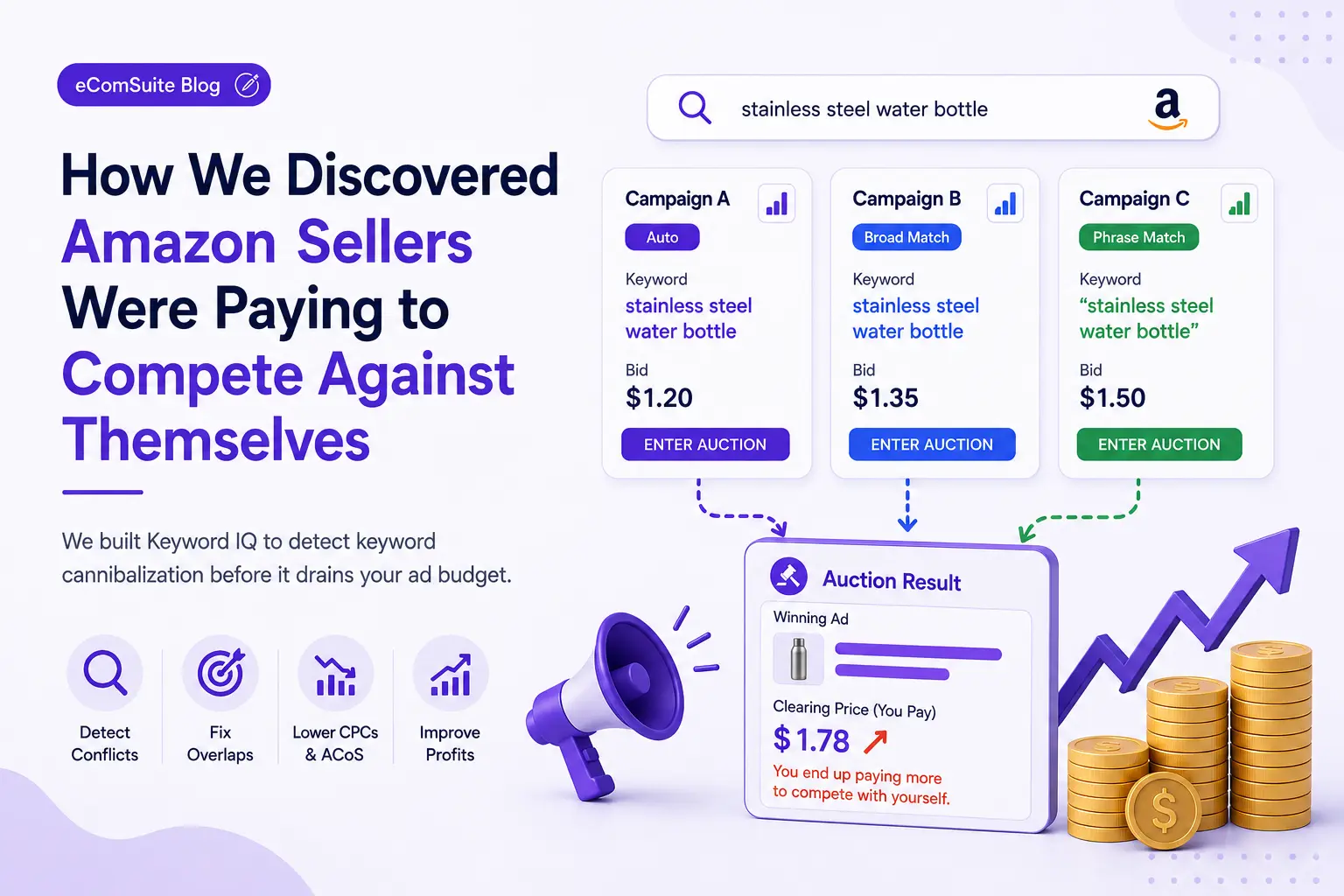
Here's the problem: if the keyword "stainless steel water bottle" exists in three of your campaigns - an auto campaign, a broad match campaign, and a phrase match campaign - all three enter that auction simultaneously. You are, in effect, bidding against yourself.
Amazon doesn't consolidate your bids. It treats each campaign as a separate advertiser. So you're not winning more impressions by having multiple campaigns cover the same keyword - you're just driving up the clearing price, and paying it yourself.
The result is a cost per click that's higher than it should be, a budget that fragments across campaigns, and performance data that becomes impossible to read cleanly.
Why It's So Hard to Spot Manually
If you have 5 campaigns and 50 keywords, you can audit this by hand in an afternoon. But most active sellers aren't working at that scale. Accounts with 30, 50, or 100+ campaigns - each with hundreds of keywords across multiple match types - create a combinatorial audit problem that spreadsheets simply can't handle efficiently.
The match type dimension makes it worse. "Running shoes" on broad match and "running shoes for men" on exact match don't look like a conflict on the surface. But depending on the search query, they can enter the same auction - and the broad campaign's presence can suppress the exact match campaign's impression share, which is exactly the campaign you've invested more precision into.
Most sellers only notice when something feels off. ACoS is elevated. Impression share on key terms is inconsistent. Specific keywords that should be profitable aren't performing. The data tells you something is wrong, but not where to look.
How We Built Detection Into Keyword IQ
When we built the Keyword IQ feature in eComSuite, the goal wasn't just to surface keyword suggestions. It was to give sellers a complete picture of their keyword health - including conflicts they don't know exist.
The detection logic works by comparing keywords across your entire active campaign structure. For each keyword, we check:
- Where else does this keyword (or a match-type equivalent) appear across your account?
- Are those campaigns running simultaneously?
- Is there a structural reason they should co-exist, or is this accidental overlap?
The output is a conflicted keywords report - a list of terms where your campaigns are genuinely competing against each other, flagged with the campaigns involved. Not a generic warning. A specific, actionable list.
For sellers with large catalogs - sometimes thousands of ASINs and dozens of campaigns per ASIN - we had to solve this at scale. Comparing every keyword against every other keyword across every campaign becomes a computationally expensive operation at that volume. We handled it by processing keyword data at the account level in batch, identifying conflicts programmatically rather than requiring manual cross-campaign review.
What to Do When You Find a Conflict
Finding a conflict doesn't always mean deleting a campaign. The fix depends on what the overlap is doing to your performance.
Scenario 1: Accidental Duplication
The same keyword exists in two campaigns with no strategic reason. One is a legacy campaign that never got cleaned up.
Fix:
Pause or remove the keyword from the lower-priority campaign. Add it as a negative to prevent re-entry through auto or broad campaigns.
Scenario 2: Match Type Overlap
A broad match campaign keeps surfacing for the same queries as your exact match campaigns, draining budget and inflating CPCs.
Fix:
Add the exact match keyword as a negative in the broad campaign. This forces all traffic for that specific query to the campaign you've actually optimized - the one with the right bid, the right ad copy, and clean performance data.
Scenario 3: Campaign Structure Needs a Rebuild
In some accounts, conflict runs deep because the campaign structure was built without a clear segmentation strategy. Broad campaigns doing discovery work were never isolated from performance campaigns.
Fix:
The fix here is structural, and it's worth doing because the gains are durable. Clean campaign architecture compounds. Messy architecture creates a ceiling that no amount of bid adjustment can break through.
The Impact: What Changes When You Fix This
When campaigns stop competing against each other, several things happen at once.
CPCs drop - not dramatically, but consistently. You're no longer artificially inflating the clearing price in your own auctions. Budget that was split across competing campaigns consolidates behind the terms that actually perform. Impression share on high-priority exact match keywords improves. And because performance data is now cleaner - each keyword in one campaign, one match type, one bid - optimization decisions become faster and more reliable.
The sellers we've seen work through a proper conflict resolution process consistently report a measurable ACoS improvement without changing their total ad budget. They didn't spend less. They stopped paying themselves to compete.
The Broader Lesson
Amazon's advertising system doesn't protect you from your own campaigns. It will happily let you bid against yourself, charge you for the privilege, and return campaign reports that make it look like you're just in a competitive category.
The only protection is visibility. You need to be able to see your entire keyword footprint - across every campaign, every match type, every ad group - in one place, and identify the overlaps before they compound.
That's what we built Keyword IQ to do. Not just to find new keywords, but to protect the ones you already have.
Ready to audit your account for keyword conflicts? eComSuite's Keyword IQ identifies conflicted keywords across your entire campaign structure automatically.
Get Started
Sign Up - Free